For telecom and fiber contractors
Every splice, drop, and ONT, with its reading and its photo
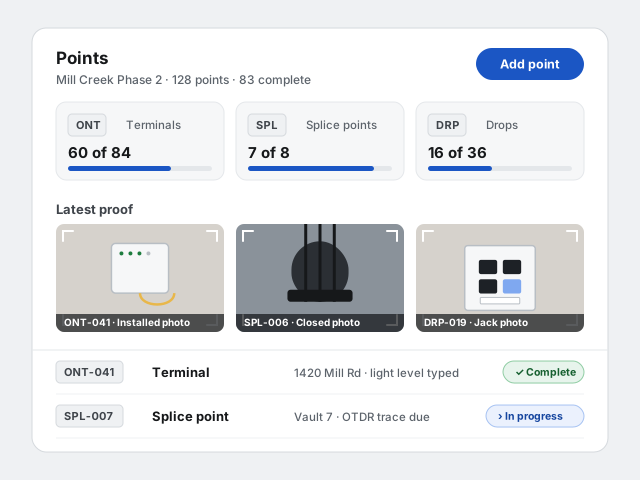
Splice points, terminals and drops are points with a photo, a reading and an attachment. The crew records them from a text link on the day, the office sees the loop fill in, and the closeout package carries every trace and every photo.
30 days free · no card required
What changes on the job
By address, by ID
The point ID carries the identifier your scheme uses, and the location field carries the address. The register is sorted and filtered by both.
Readings as values, traces as files
Light levels and power readings are typed values; the OTDR trace is an attachment. Both live on the point and both go in the package.
Daily reports across many sites
A crew that moves between sites in a day still sends one report per project, with one GPS reading checked against that site's geofence.
Your point types, your IDs
These are examples. Point types belong to your organization: set yours up in minutes, in English and Spanish, with the checklist each must satisfy.
ONT-001, ONT-002, …
Terminal
Proof checklist
- Installed photo
- Serial (value)
- Light level (value)
SPL-001, SPL-002, …
Splice point
Proof checklist
- Closed and open photos
- Fiber count (value)
- OTDR trace (attachment)
DRP-001, DRP-002, …
Drop
Proof checklist
- Jack photo
- Port-map entry
- Test report (attachment)
What the package hands over
The turnover package assembles itself from proof that already exists: a formal PDF register plus supporting files organized by point and by date. It is the package the GC’s closeout software is waiting for, built on your side of the handover.
- The point register by type, with each point's address and status
- Photos, readings and traces filed under the point they belong to
- Port maps per drop
- The replacement schedule for swapped equipment, with serials
- The daily work record, in order, with photos and point counts
The same product for every trade
6
kinds of need a tech can raise from the phone: material, tool, information, access, decision, or scope.
1
GPS reading per daily report, taken on the form and checked against the site geofence. No tracking.
2
languages on the field surface, English and Spanish, chosen once by the tech and remembered.
Questions from the trade
Do my techs need to install an app?
No. Each tech gets a text with a link, and the report opens in the phone’s browser. There is nothing to install and no password to remember. The field surface works in English and Spanish.
What if a tech has no signal on site?
The written report saves as a draft on the phone, and a photo that fails to upload stays on the form with a retry button, so the tech can send it when signal returns without redoing anything. A missing or denied GPS reading is recorded as such and never blocks a report.
Is Bana tracking my crew’s phones?
No. Bana takes one GPS reading when a tech opens the report form, shows it to the tech, and sends it with the submitted report, checked against the jobsite geofence. There is no background location and no location history, and off-site flags are visible to your office only.
What happens if a tech replies STOP to a text?
That number is opted out of texts across Bana until it replies START. Nothing is blocked: the tech’s daily link falls back to email when there is an address on file, and the office sees each tech’s reachability as text, email only, or unreachable.
How does a point get marked complete?
Nobody declares it. Each point type carries a proof checklist, and a point becomes complete when the required lines are satisfied by photos, videos, values, or attachments. The office can mark a point Needs attention or Not required; everything else is computed from proof.
How are device swaps recorded?
A replacement is a flag on the point, not a new point. The tech records the removed device with a before photo, description, make and model, serial, condition, and where it went, and the replacement schedule carries into the customer portal and the turnover package.
Does Bana work for my trade?
Yes, if your crew installs, labels, and tests things one at a time. Point types belong to your organization and you define them: the ID prefix, the name in English and Spanish, and the proof checklist, from photos and typed values to attachments and port maps. The defaults are low-voltage types; replacing them with your own takes minutes in Settings.
Can I get my data out?
Yes. Turnover packages download as a PDF register plus organized supporting files, and a data export packs any project, or your whole organization, as CSV tables with the same file structure. Export links stay live for 7 days. If you cancel, your records stay readable for at least 12 months.
Can one project cover many addresses?
A project has one site location and geofence, so a route of many addresses is usually one project per area with the address in each point's location field. Plans are optional, so a project without drawings works the same way.
Put your next fiber job on Bana
Define your point types, text your crew their links, and the first daily report lands tonight. 30 days free with no card required.