Closeout and as-builts
Closeout packages that build themselves all job long
Every photo, test report, and daily report your crew submits is already organized by drop. When the job wraps, Bana assembles the turnover package: a formal PDF register plus supporting files the GC can actually navigate.
30 days free · no card required
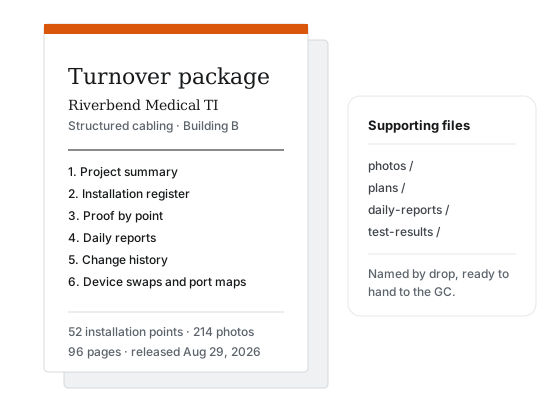
What’s in the package
The full register
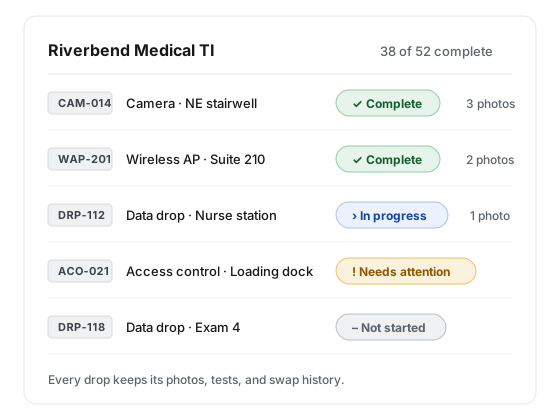
Every drop with its status, location, and history, set in a formal document register the GC can file.
Proof by drop
Photos, videos, values, and attachments filed under the drop they document, named so anyone can find them without a guide.
The paper trail
Daily reports, change requests, device swaps, and port maps. The whole story of the job, in order.
As-builts
As-builts start on day one
As-built documentation usually means reconstructing the job from memory after demobilization. In Bana it accumulates as the work happens: swaps are recorded when they occur, port maps stay current, and the register always matches the wall.
A package is one version. Generate a working copy whenever you like, release the one you hand over, and every version stays on record.
Eight sections, one document
The PDF is letter size, black on white, and reads the same in grayscale. Status is carried by words, never by color alone.
Project summary
The job, the customer, the dates, and the counts.
Pinned plan overviews
Each plan sheet with its pins, so the register maps to the drawing.
Installation point register
Every point with its ID, type, location, and status.
Proof by point
Photos, values, and attachments, filed under the point they document.
Daily work record
The submitted daily reports, in order, with their photo and point counts.
Replacement schedule
Removed devices with make, model, serial, condition, and disposition.
Change requests
The changes you marked for closeout, with their outcome.
Closeout attachments
Test reports and other files, plus a ZIP of everything organized by point and by date.
Questions about records
How does a drop get marked complete?
Nobody declares it. Each point type carries a proof checklist, and a point becomes complete when the required lines are satisfied by photos, videos, values, or attachments. The office can mark a point Needs attention or Not required; everything else is computed from proof.
How are device swaps recorded?
A replacement is a flag on the point, not a new point. The tech records the removed device with a before photo, description, make and model, serial, condition, and where it went, and the replacement schedule carries into the customer portal and the turnover package.
Can I get my data out?
Yes. Turnover packages download as a PDF register plus organized supporting files, and a data export packs any project, or your whole organization, as CSV tables with the same file structure. Export links stay live for 7 days. If you cancel, your records stay readable for at least 12 months.
Hand over the job, not a homework assignment
Start collecting proof on your next project and the closeout package is done when the work is. 30 days free with no card required.