Customer portal
Your customer sees progress, not your process
Invite the customer or the GC to a read-only view of the job. They get what’s done, what changed, and what’s scheduled, plus a daily report email, without a login to your office or a call to your PM.
30 days free · no card required
Kept in the loop, all job long
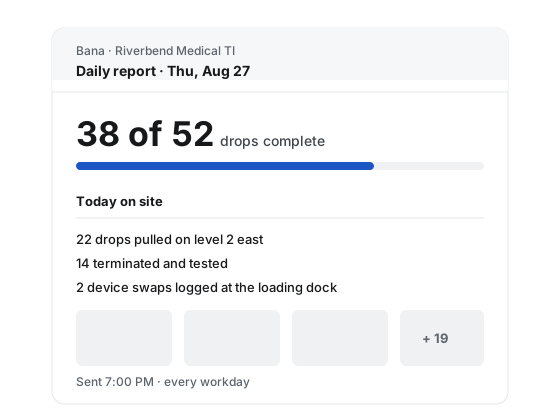
A daily report email
One digest per project per work date, at the send time you set, only on days with a submitted report. Progress, photos, and the day’s summary.
A read-only view of the job
Points, plans, schedule, requests, changes, and daily records, read the way you would want a customer to read them.
The turnover package, when released
The customer downloads the released version of the closeout package from the same portal. Working copies stay with you.
Nine sections, zero training
The portal reads like a report, not a tool. Customers can raise a change request; everything else is read-only.
Overview
Where the job stands: drops complete out of the total, and the latest daily record.
Points
Every drop with its ID, type, and status, and the proof filed under it.
Plans
The plan sheets with pins, view only. Pins are placed by your office.
Replacements
The replacement schedule: removed devices with make, model, serial, condition, and disposition.
Schedule
Work dates and whether each is a full or half day. Never who is on the crew.
Requests
Field requests you chose to share, such as information, access, and decisions the customer owes.
Changes
Change requests the customer raised or you recorded, with their status.
Daily records
Each submitted daily report with its summary, photos, and counts.
Turnover package
The released closeout package, downloadable by the customer.
What stays internal
Built with a privacy wall, not a filter
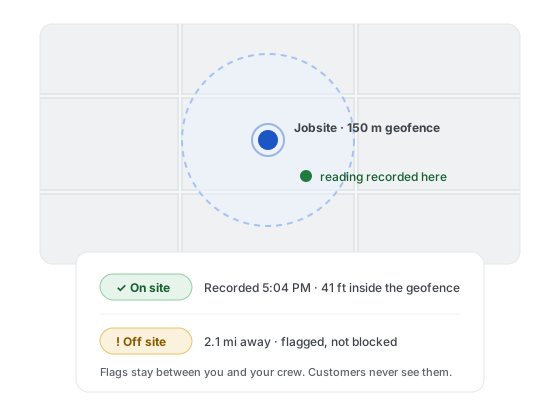
The portal never reads GPS coordinates, distances, late or missed flags, unscheduled-day flags, or who submitted from where. Those fields are not hidden from the customer view; they are never collected into it.
Material, tool, and scope requests stay internal by default. Share one when the customer needs to see it.
Questions about customers
What does the GC or customer see?
Customers get a daily report email and a read-only view of the job: progress, photos, plans, schedule, requests, changes, and the turnover package once it is released. Internal flags such as late, missed, or off-site never appear on customer surfaces, and the schedule shows dates, not who is on the crew.
When does the customer’s daily report go out?
Once per project per work date, at a send time you set (7:00 PM local by default), and only on days with at least one submitted report. It goes out in English and is never resent; a late report updates the in-app record instead.
Stop being the status report
Put the job on Bana, invite your customer, and the daily report arrives before they think to ask. 30 days free with no card required.