For technicians
A text link, three fields, and back to the truck
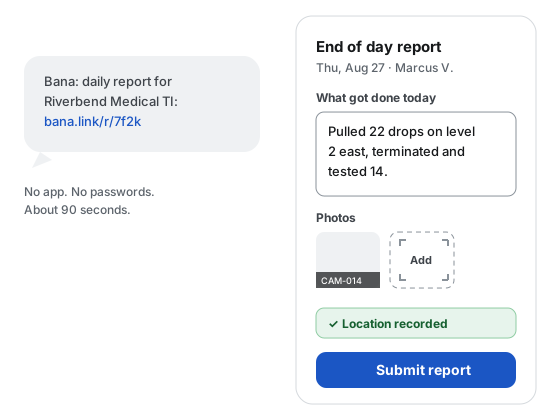
No app to install, no password to remember. The link in the morning text opens the day’s report in the phone’s browser, in English or Spanish, and it takes about 90 seconds to send.
30 days free · no card required
A day on Bana
The link arrives by text
At the send time the office sets, each scheduled tech gets a link for that project and that day. Tap it and the report opens; nothing to sign in to.
Work the drops
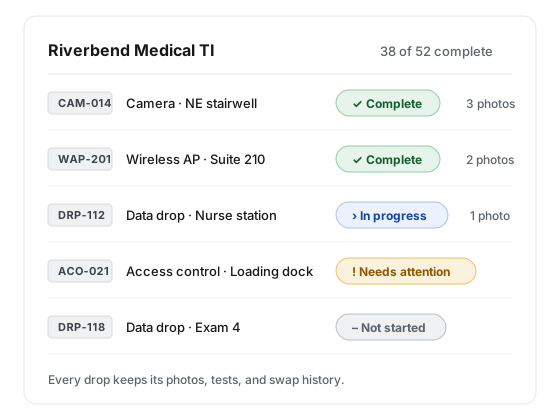
Each drop is a card with its checklist: photos, a video, a value, an attachment, a port map. Add proof as you go and the drop marks itself complete.
Send the report
A summary, at least one photo, and location. Everything else is optional. Late is a flag for the office, never a locked door.
Proof by drop
CAM-014 on the wall is CAM-014 on the phone
Every drop carries its type and its ID, the same one printed on the label. Claim a drop, attach the photo, type the serial, and the checklist ticks itself. The office reads the same record you wrote.
A photo that fails to upload stays on the form with a retry button. The written report saves as a draft on the phone until it is sent.
Say what you need, once
A need is a request the office sees right away, with an urgency and a status that comes back to you.
Six kinds of need
Material, tool, information, access, decision, or scope. Pick one, say what and how urgent.
Answered, not lost
The office acknowledges, fulfills, or declines with a reason, and the answer shows on your phone.
Device swaps, recorded on the spot
Replacing a device? Photograph the old one, note its make, model, serial, and condition, and say where it went.
What the link promises
0
apps to install, passwords to remember, or accounts to create. An account is optional, never required.
7 days
is how long the day’s link stays live after the work date. A dead link offers a new one in one tap.
1
GPS reading, taken on the form and shown to you before you submit. No background tracking.
Questions from the field
Do my techs need to install an app?
No. Each tech gets a text with a link, and the report opens in the phone’s browser. There is nothing to install and no password to remember. The field surface works in English and Spanish.
What if a tech has no signal on site?
The written report saves as a draft on the phone, and a photo that fails to upload stays on the form with a retry button, so the tech can send it when signal returns without redoing anything. A missing or denied GPS reading is recorded as such and never blocks a report.
Is Bana tracking my crew’s phones?
No. Bana takes one GPS reading when a tech opens the report form, shows it to the tech, and sends it with the submitted report, checked against the jobsite geofence. There is no background location and no location history, and off-site flags are visible to your office only.
What happens if a tech replies STOP to a text?
That number is opted out of texts across Bana until it replies START. Nothing is blocked: the tech’s daily link falls back to email when there is an address on file, and the office sees each tech’s reachability as text, email only, or unreachable.
Text your crew their links tonight
Set up a project, add the crew, and the first daily report lands the same evening. 30 days free with no card required.