For low-voltage contractors
Proof of every drop, from first pull to closeout
Bana collects per-drop proof from your crew: photos, test reports, and GPS-verified daily reports. It assembles everything into a turnover package the GC can sign off, and your customer stays in the loop for the whole job.
30 days free · no card required
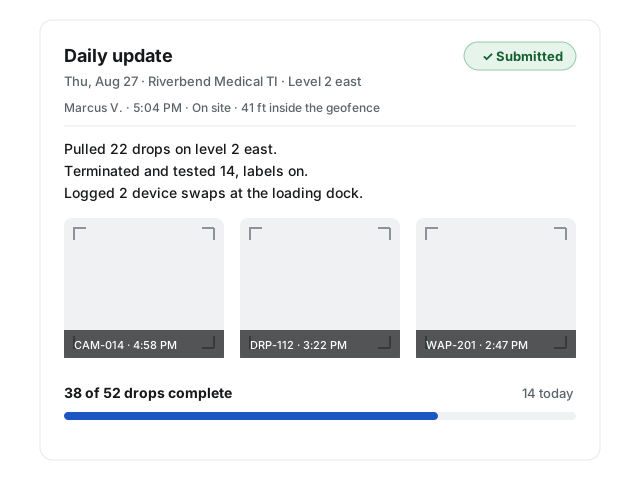
Everything the job produces, in one record
Proof by drop
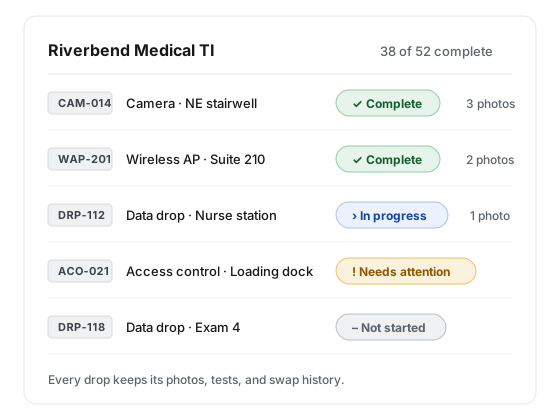
CAM-014 on the wall is CAM-014 in Bana. Photos and test notes land on the drop they belong to, so as-builts build themselves.
Verified daily reports
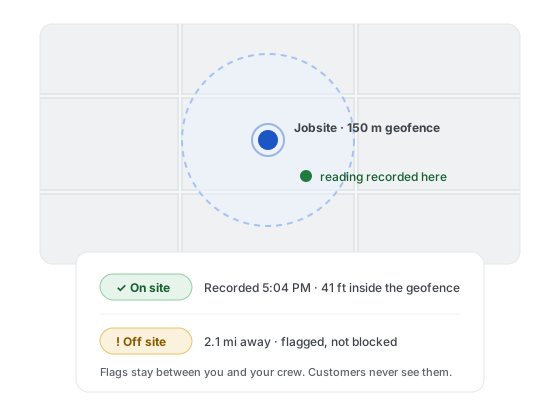
A text link, about 90 seconds, one GPS reading checked against the jobsite geofence. Flagged when off site, never blocked.
Closeout that assembles itself
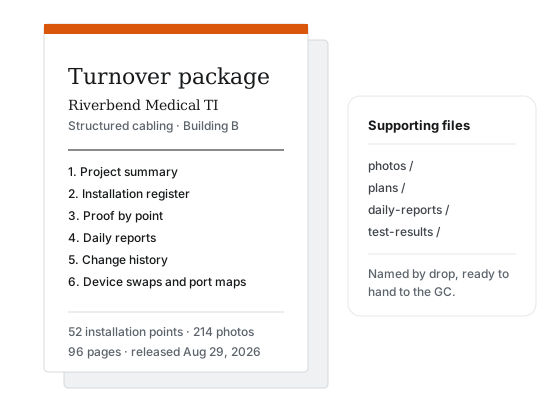
When the job wraps, the turnover package is a PDF register plus organized files, built from proof that already exists.
One record of the job. Everyone reads from it.
The crew reports once. The office, the customer, and the closeout package all work from what they sent.
Daily reports
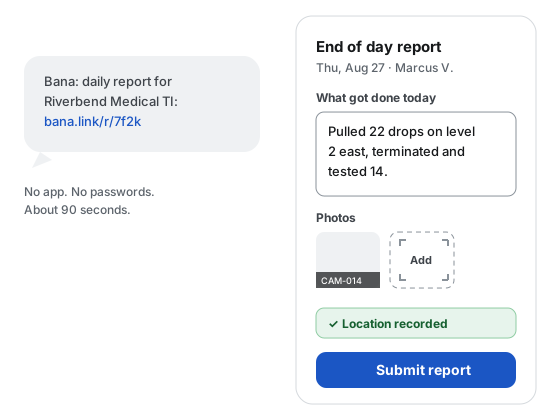
Daily reports, straight from the crew
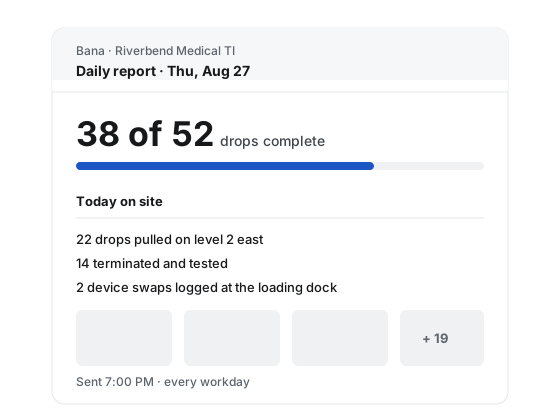
Techs get a text link at the start of the day. There is no app to install and no password to remember. A daily report takes about 90 seconds: what got done, photos, and location.
The office gets a clean construction daily report the same evening, and so does the customer.
Points register
Every drop labeled, photographed, accounted for
CAM-014 on the wall is CAM-014 in Bana. Photos and test notes land on the drop they belong to, so as-built documentation builds itself while the job runs instead of from a shoebox of pictures afterward.
GPS verification
Location-verified, without tracking anyone
Every report carries one GPS reading, taken while the report is open and checked against the jobsite geofence. Off-site reports are flagged for the office and never blocked. Nobody’s phone is followed around.
Closeout packages
A turnover package the GC signs off
When the job wraps, the closeout package assembles itself from proof that already exists: the full drop register, photos, daily reports, change history, and device swaps.
You hand over a clean PDF with organized supporting files, not a two-week scramble after demobilization.
Customer portal
The customer sees progress, not your process
Customers get a daily report email and a read-only view of the job: what’s done, what changed, and what’s scheduled. Internal flags like late reports and off-site submissions stay internal.
Find the plan for your jobs. Try it free for 30 days.
Plans are priced by how many active projects you run, with unlimited people on every tier.
Starter
$149per month
Start free trialStarter includes:
- 3 active projects included
- $1 per extra project per day, confirmed before it starts
- Unlimited office users, technicians, and customer collaborators
- Every Bana capability, no feature tiers
Most room to grow
Core
$299per month
Start free trialCore includes:
- 10 active projects included
- $1 per extra project per day, confirmed before it starts
- Unlimited office users, technicians, and customer collaborators
- Every Bana capability, no feature tiers
Pro
$599per month
Start free trialPro includes:
- 25 active projects included
- $1 per extra project per day, confirmed before it starts
- Unlimited office users, technicians, and customer collaborators
- Every Bana capability, no feature tiers
Every plan starts with 30 days free: 2 active projects, 250 text messages a month, and 5 GB of photo and video storage. No card required, and everything your crew reports carries into your paid plan.
All plans billed monthly. All prices USD. Active projects are jobs that are not closed: setup, active, dormant, and closeout each hold a slot. Going over your included count is a soft per-day overage, itemized on your bill. It never blocks the work.
Find the answers you need
Do my techs need to install an app?
No. Each tech gets a text with a link, and the report opens in the phone’s browser. There is nothing to install and no password to remember. The field surface works in English and Spanish.
What if a tech has no signal on site?
The written report saves as a draft on the phone, and a photo that fails to upload stays on the form with a retry button, so the tech can send it when signal returns without redoing anything. A missing or denied GPS reading is recorded as such and never blocks a report.
Is Bana tracking my crew’s phones?
No. Bana takes one GPS reading when a tech opens the report form, shows it to the tech, and sends it with the submitted report, checked against the jobsite geofence. There is no background location and no location history, and off-site flags are visible to your office only.
What happens if a tech replies STOP to a text?
That number is opted out of texts across Bana until it replies START. Nothing is blocked: the tech’s daily link falls back to email when there is an address on file, and the office sees each tech’s reachability as text, email only, or unreachable.
Learn more about Bana
- See the field surface
For technicians
What the crew sees on their phone
- See the portal
For customers
The read-only view your customer gets
- See everything
All features
Points, plans, schedule, requests, exports
- Read the policy
Privacy
How the single GPS reading works, and who sees it
Put your next job on Bana
Start with 30 days free, no card. Set up a project, text your crew their links, and watch the first daily report land the same evening.